
How to create a QA report template (with template)
PD
Reporting is critical to the software quality assurance (QA) process. Teams use QA reports to share their findings after the testing process. These reports describe the tests performed, identify defects, and provide actionable insights to improve software quality.
However, QA reporting isn’t always clear. Unstructured reports, poor formatting, and ambiguous metrics can confuse developers and other stakeholders. As a result, teams may misunderstand a QA team’s recommendations and fail to take the necessary actions.
TestRail supports reporting with consistent and traceable testing analytics. Our comprehensive platform stores test results and links test cases to software requirements. In this guide, we explore how to set up a QA report template that delivers valuable insights.
What is a QA report template?
A QA report template provides a structured format to share test results and product release status. It documents the work the QA team performs when testing a new feature, component, or other change to an application’s codebase.
To compile a QA report, testing teams review the raw execution data from their test use cases and scenarios. They translate the raw data into objective findings. The final document summarizes the test’s purpose and requirements, results, identified defects, and any suggestions for improvement.
Theoretically, teams can draft a QA report any time there’s a change to the codebase. In practice, that’s not the best use of time, since an application’s features and functions may not be finalized or ready for testing.
QA reports are most useful during sprints, milestones, or full product releases. When prepared at the end of a testing cycle, they document the testing process and the team’s findings. Stakeholders can review the reports and decide whether further action is needed before moving on to the next development phase or releasing a product.
TestRail serves as a centralized repository for generating consistent reports. Using the platform, teams can view test status, progress, and more. It organizes reporting around specific milestones, test plans, and projects, so data reflects your current workflow.
Why structured QA reporting improves release decisions

QA reports are retained by the QA team, but they’re also distributed to other stakeholders, including developers, product managers, and executives. These individuals may not be involved in the day-to-day QA process. They don’t write tests or evaluate their results. Instead, they expect a definitive report from QA teams that explains the work performed and whether there are action items to address.
When reports use inconsistent structure or formatting, it makes it hard for stakeholders to compare releases or understand the context of the testing. As a result, stakeholders may not have the information they need to make a product release decision.
Standardized reporting reduces confusion. With a structured report design, stakeholders can quickly review findings and make informed decisions. And with TestRail, your team benefits from dashboards that summarize critical test activity, plus saved report templates that maintain consistency.
What to include in a QA report template

A QA report template keeps the documentation process straightforward. It provides an outline for your team to follow when drafting reports for stakeholders, so they receive a clear recap of testing activities. QA reports often include these sections:
Executive summary
The executive summary provides a high-level view of the tests performed, their overall status, and final recommendations. It consists of several short paragraphs or a bulleted list that sums up the content of the full report.
Scope and environment
Within this section, outline the specific objectives of the test and their purpose. Identify the features tested during the test cycle, including the testing environments and configurations used. Note any testing features or functions that were out of scope.
Test execution results
Describe the tests performed and their outcomes. Detail the total number of tests and whether they passed, failed, or were blocked. If you skipped specific testing areas, explain why.
Sometimes, new updates or features require retests of previously released components. Share a comparison of test results from the previous release if it provides practical insights.
Defect summary
Document any errors or defects identified during the testing process and indicate their severity and status. Note high-severity and open defects near the top. These are issues that developers will want to resolve, as they may impact release confidence.
If you notice any trends during the testing process, include them in your notes. Patterns may indicate a problematic component or function, which developers can review.
Share a list of known blockers in the defect summary, if any. These critical errors can prevent software from working, so teams should address them before release day.
Coverage overview
Link the testing process to the specific project requirements or features that were covered, and specify any elements with limited coverage. For example, if you thoroughly tested the user authorization function, but not the user account information, you’d clarify that.
Demonstrate the traceability between the tests performed, the project’s requirements, and any defects you found. This helps stakeholders understand the connection between the defects and how they may affect the project’s overall performance.
Risks and open concerns
Include a clear, objective statement regarding the project’s remaining risk. If there are any areas or known gaps that require additional monitoring after the project’s release, identify them. Your insight can help stakeholders determine if the project is ready for release or requires more work.
How to design a QA report template that scales

When QA testing spans multiple projects and releases, reporting can become chaotic. A QA report template provides a standardized reporting outline you can scale across testing activities. To create one, take these steps:
Focus on decision-making
Leadership uses QA reports to make decisions about a product. Put yourself in their shoes and figure out what factors matter most to them. These are the details that you’ll want to highlight in the executive summary and risk sections of the report.
Brief, direct summaries work best. Avoid using too much detail, as it may confuse readers. You can expand on your findings in the notes of the report.
Keep metrics consistent
Determine which metrics are most appropriate for your projects, and include them in every report and release. Clearly define them, and avoid changing their interpretation across projects.
Retain the same report structure across every sprint, and save a template in TestRail’s centralized repository. That way, your entire team uses the same standardized report to prepare their findings.
Reduce manual work
Import the results from test runs directly to your QA reports to reduce manual data entry and save time. With TestRail’s reporting functions, you can quickly generate summaries that explain key findings.
Common mistakes in QA reporting

The goal of QA reporting is to share reliable information with stakeholders so they can take action. These mistakes can damage the reporting process:
- Detail overload: Keep QA reports brief, candid, and free of raw data.
- Hiding serious defects: List severe defects prominently within the executive summary and defects sections of the report.
- Metric changes: Use the same metrics across every product release.
- Lack of traceability: Link defects to specific tests, so developers understand the problem.
- Maintaining separate spreadsheets: Retain test and report information in an accessible repository.
TestRail’s centralized reporting platform offers a single space for teams to access QA report templates and test data. Our tools prevent typical reporting mistakes and allow your team to develop reports that stakeholders can rely on.
How to share QA reports with stakeholders
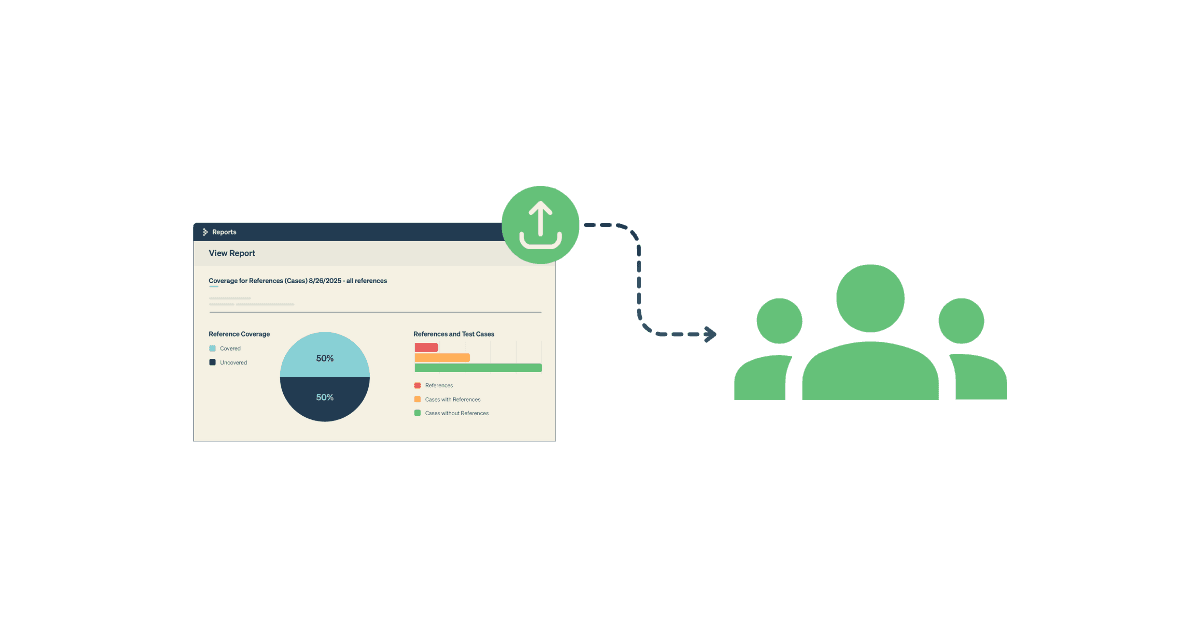
After QA testing ends, developers, product managers, and leadership will want to know the results. Use these best practices for optimal communication.
Align reports with release timing
Wait until the end of a sprint or milestone to prepare QA reports. As the codebase is fluid while developers are actively working, test results may change.
Keep a clear record of pass rates and defect counts across releases. Including a comparison can help stakeholders understand how changes to the application affect its performance. TestRail’s milestones feature provides a detailed view of shifts in testing you can incorporate into your report.
Share the right level of detail
Tailor your QA reports to fit each stakeholder’s specific needs. Leadership will appreciate a short summary, while engineers benefit from an in-depth breakdown of test results. Schedule a specific time to send reports so that teams don’t have to request them.
How to track QA metrics across releases

Changes in a test’s metrics are important to monitor, since they may signify that new code is affecting an application’s performance. Use these techniques to stay on top of metric variations.
Track pass rates and defect trends over time
Keep a clear record of pass rates and document them every time you run a test. A table that indicates the test name, run date, and outcome makes it easy to monitor changes.
Note any recurring defect areas and high-risk workflows across versions. Sharing patterns and trends can help engineering teams determine which features or components require additional work.
Use dashboards to support release calls
Incorporate dashboards with key metrics, such as open defects and test status, into your reporting process. This gives stakeholders a quick, real-time overview of test results, which they can use to support go-or-no-go decisions.
How TestRail supports structured QA reporting

Seventy percent of organizations monitor pass/fail rates, and 60% track defects in production. However, many QA teams lack clear visibility into their root cause. TestRail helps close the data gap with its analytics and reporting tools.
Turn raw test results into structured reports
With TestRail, teams can automatically generate reports based on test runs and milestones. The platform details pass rates, testing progress, and defect status in real-time. This allows you to compare results across releases and pinpoint trends, anomalies, and patterns.
Schedule reports so engineering, product teams, and leadership receive the information they need on time, and save your preferred QA report template in the centralized repository.
Improve traceability from requirement to defect
Over 70% of teams that use reporting tools with strong traceability report fewer escaped defects. TestRail is equipped with features that link project requirements to test cases and connect test runs with defects in Jira. These tools provide a full audit trail, tracing errors until they’re fixed.
Coverage reporting is available across releases. It shows how well your tests cover an application’s requirements, so you’ll know whether additional testing is needed.
Tying QA reports with traceability and coverage demonstrates the extent of a product’s validity. High coverage and traceability provide assurance that an application is ready for end users.
Combine manual and automated test results in one report
According to our research, 86% of teams that report high levels of test automation and CI/CD integration release faster. Another 71% find that test automation and CI/CD integration reduce defect leakage. TestRail supports these workflows by tracking test automation progress and importing automated test results, without the need to switch tools.
Through TestRail, you can combine manual and automated results into one report. The result is improved test accuracy, even when you’re running thousands of tests daily.
Monitor defect patterns and coverage gaps
Pass and fail rates are informative, but they don’t tell the full story. Teams benefit from deeper insights that identify defect patterns and coverage gaps. These insights allow teams to improve the QA process, enhancing test robustness and coverage.
TestRail’s analytics tools monitor defect trends and track test coverage by feature or requirement. This helps teams detect high-risk areas before a product’s release. It also measures execution progress across milestones, so teams know how thoroughly a product is tested during each sprint.
Keep reporting consistent as teams scale
Faster releases and new products make it harder to manage the QA reporting process manually. With TestRail’s centralized platform, your organization can standardize QA reports across projects using consistent metrics. This reduces manual reporting overhead and supports informed, structured release decision-making.
Free QA report template (copy and customize)
A consistent QA report structure keeps insights organized and readable. This QA template includes sections that are commonly used in QA reports, but feel free to adapt it to suit your organization’s needs.
| Project information | Include the project name, release or build number, test dates, and a brief scope or description of the testing activities. |
| Test objective | Explain the purpose of the testing, the types of tests performed, and how it can help support a specific decision. |
| Test scope | List the features included in the testing and any excluded items. Indicate the environments evaluated during the testing process. |
| Test execution summary | Share a table or bullets that outline: -Test cases planned |
| Defect summary | Summarize the defects found during the testing process. Highlight the most severe defects and their status at the top of the summary. Providing a list or table with the following data keeps the section scannable: -Total defects Example:- Out of 115 planned tests, 15 defects were found.- Of the defects identified, 13 are open, and two are closed.- One open defect is severe, 12 are moderate, and two are minor.- The open, severe defect is a critical blocker that is currently under investigation. |
| Coverage overview | Explain which features and requirements the tests cover. Identify any untested areas, and the percentage of tests that were performed using automation versus manually. Include a summary of high-risk flow pass rates. |
| Test environment | List details about the test environment, including: -Platform or operating system (OS) versions |
| Risks and release recommendation | Name any open, high-severity defects and known risks. Provide readers with a clear go-or-no-go statement. |
How to format your QA report for readability
QA report readers fall into two camps: those who prefer a quick summary and those who need more detail. For maximum readability, include the executive summary on the first page, use consistent metrics, and incorporate scannable bullet points for test results and defects.
Engineers benefit from raw data, which they can use to investigate defects. Include this information in a dedicated section outside the summary.
Start building a scalable QA reporting process
Small QA teams can grow quickly, especially when you introduce new projects or product features. With a standardized QA report template, you can improve stakeholder communication and reduce software quality risk. Your robust QA reporting process will provide the foundation for future scalability.
TestRail supports QA reporting consistency with its centralized repository and analytics features. To explore how the platform can enhance your team’s QA reporting, start a free 30-day trial today.